Find Movie Filming Locations: AI-Powered Guide to TV Show Settings
Ever watched a jaw-dropping movie scene and thought, ‘Where is THAT place?!’ Maybe it’s a sunlit Parisian café from a rom-com or a misty mountain peak in Lord of the Rings. For travel buffs and film fans alike, visiting these iconic spots—a trend called ‘set-jetting’—turns fantasy into reality. But finding them? That’s the tricky part.
Dubbed "set-jetting," this trend transforms everyday streets and remote landscapes into bucket-list destinations. Fans now chase the thrill of walking in their favorite characters’ footsteps. However, finding these exact spots is often harder than it looks. In the past, fans spent hours on forums. They waited for official "behind-the-scenes" books that took months to release.
Today, professional studios are very careful about their production secrets. They often remove geotags and GPS data from their promotional photos. If you have a screenshot of a beautiful location, how do you find it? You can try this tool to start your search immediately.
Let’s uncover why Google searches fail for movie locations and how AI fills the gap. We will show you how modern AI technology identifies almost any TV show setting. Whether you are a dedicated traveler or a curious movie fan, this guide reveals the story behind every frame.

Why Traditional Search Fails to Find a Photo Location
Most people start their search with a standard search engine. While these help for famous landmarks like the Eiffel Tower, they struggle with specific movie sets. Film production creates illusions. These illusions easily trick standard search algorithms.
How Studios Hide Filming Locations (And How AI Finds Them)
Production teams masterfully hide reality. They alter on-location scenery to match the story—adding fake signs, repainting buildings, or using CGI. A street in Atlanta might be disguised to look like New York. A forest in Canada might be edited to look like another planet.
Furthermore, studios protect their data fiercely. When photographers take "stills" on a movie set, cameras record metadata called EXIF data. This includes the date, time, and exact GPS coordinates. Before these photos reach the public, studios strip this information away. Without this "geotag," a standard photo viewer cannot identify the location. This is why you need more than just a metadata reader.
Limitations of Reverse Image Search for Entertainment Content
Traditional reverse image search tools look for exact matches on the web. This works if you want to find the original source of a meme. However, it is not effective for identifying specific filming locations.
Upload a show screenshot, and reverse image search will name the actors—not the street address behind them. Why? Traditional tools prioritize ‘who’ over ‘where.’ Standard search engines look for the "what" in a photo. They see a famous actor and prioritize that data. They might not recognize a unique architectural style or specific tree species. To find a location, you need a system that analyzes the environment itself. By using an online tool, you can focus on the geographical details that traditional searches miss.
AI Vision Analysis: The New Way to Identify TV Show Settings
Technology has changed how we analyze images. We no longer rely on hidden metadata or basic keywords. Advanced AI vision analysis "looks" at a photo like a human expert would. It combines this with the speed and memory of a supercomputer.
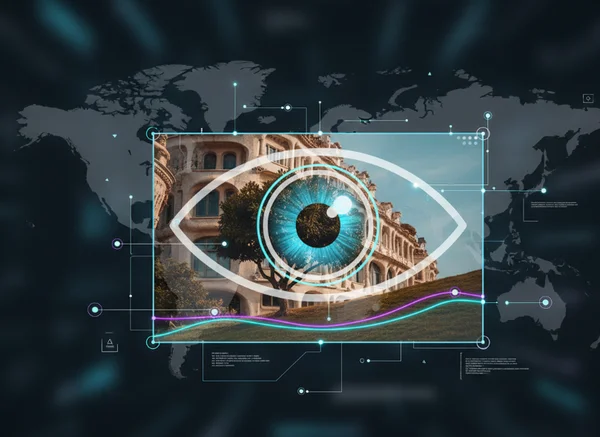
Landmark Recognition in Screenshots
The first step in modern identification is landmark recognition. This does not just apply to famous statues. AI can recognize "micro-landmarks." These are smaller, unique features like a specific bridge design or a unique church spire.
When you upload a screenshot, our AI scans the image for these visual markers. It compares features against a massive global database of geographic information. Production teams might change the signs on a building, but the architectural structure usually remains. The AI recognizes these permanent structures to pin down a location on a map.
Unbeatable AI Clues: Natural Features Studios Can’t Hide
Studios can change many things, but they cannot change everything. Nature and urban layouts are difficult to hide completely. Our AI looks for specific visual clues that are hard to fake:
- Topography: The shape of hills, mountains, and the horizon line.
- Vegetation: The types of trees and plants that grow in specific climates.
- Architecture: The style of windows, rooflines, and brickwork common in certain regions.
- Street Layouts: The way roads intersect or the specific design of stones.
These details act like a "fingerprint" for a location. Even if the foreground is full of actors and special effects, the background contains clues. A smart location finder uses these clues to determine the truth.
Our Multi-Step Process to Find Location from Photo
Our AI-powered tool doesn’t just guess. We use a transparent, multi-step process to ensure accuracy. When you upload an image, you can see the AI working through these steps:
-
Metadata Extraction: First, we check if any EXIF data remains. Sometimes, small pieces of data still provide clues.
-
Visual Feature Matching: The AI identifies landmarks, textures, and environmental colors.
-
Geographic Cross-Referencing: The system compares features with satellite imagery and street-level data.
-
Confidence Scoring: We provide a confidence level for the result. This tells you how certain the AI is about the location.
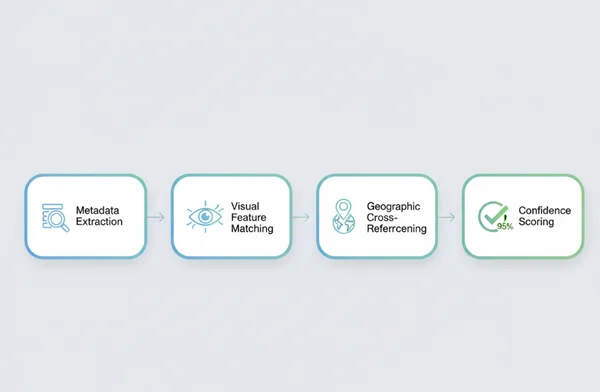
This process turns a simple search into a small adventure. You see exactly how the "thinking" happens. You can test it yourself with a screenshot from your favorite movie.
Real Case Studies: Finding Filming Locations from Popular Movies
To understand how powerful this technology is, let's look at real-world examples. Many popular movies use locations that seem impossible to find. AI can reveal them in seconds.
Breaking Down "Stranger Things" Season 4 Key Scenes
In the fourth season of "Stranger Things," the story moves beyond the fictional town of Hawkins. One of the most striking locations is a snowy, desolate prison. While the show is set in Russia, it was actually filmed in Europe.
Fans who uploaded screenshots found that the AI identified the Lukiškės Prison in Vilnius, Lithuania. The AI didn't just look for "a prison." It looked at specific brick patterns and the unique circular layout of the wings. By cross-referencing these features with historical landmarks, the tool provided exact coordinates. This allowed fans to learn about the building, which is now a cultural center you can visit.
From Screen to Street: Identifying Marvel Movie Locations
Marvel movies are famous for massive action scenes in major cities. In "Avengers: Infinity War," a significant battle happens in what looks like a historic European city. Many viewers assume scenes like this use studio lots. In reality, much of the filming took place in Edinburgh, Scotland.
Using AI analysis, fans identified specific shops on Cockburn Street. They spotted the architecture of the Royal Mile. The AI recognizes the specific stone used in Scottish buildings and the unique slope of the streets. Even with explosions and CGI added, the "bones" of the city remained visible. You can use the AI tool to find similar spots in your favorite blockbuster movies.
Your Next Steps to Find Location from Photo
Finding movie locations is no longer a mystery for industry insiders. With AI, any fan can become a "location scout" from home. Whether you are planning a trip or just curious about a beautiful scene, the tools are ready.
Remember that clear images produce the best results. Try to use screenshots that have background detail. Mountains, buildings, or unique streets are better than close-up shots of an actor's face.
If you have a photo or a screenshot that has been bothering you, don't leave it to guesswork. Use our platform to analyze your images and discover the real world behind the screen. It is fast, easy to use, and requires no technical knowledge. Visit our homepage today and start your journey of discovery.
Ready to play detective? Upload your screenshot—no geotags needed—and let our AI pinpoint the exact spot in seconds. Your next adventure starts here.
FAQ Section
Can AI really find locations from screenshots without geotags?
Yes, it can. Geotags make the process instant, but modern AI does not require them. Instead, it uses "Visual Content Recognition." The AI "looks" at the pixels in the image to identify landmarks, building styles, and natural features. It then compares these features to a global database to find a match. This is exactly how we help users find the place where a photo was taken, even if all metadata has been removed.
How accurate is AI location identification for TV shows?
Accuracy depends on the environmental detail in the image. If the screenshot shows a unique building or a specific mountain range, accuracy is very high. It is much harder to identify photos taken inside small rooms with no windows. However, our tool provides a "confidence score." This lets you know how certain the AI is about its findings.
What types of locations are hardest to identify automatically?
The hardest locations to identify are "generic" or heavily modified by CGI. For example, a vast desert with no unique rock formations can be difficult. There are thousands of similar places worldwide. Also, if a scene is 90% green screen, the AI may only identify the small real-world elements used. In these cases, the AI provides the most likely regions based on vegetation or soil type. To see what our AI can do, you can try our free tool with your own images.